Summary
Following our hacking of Xiaomi home security cameras, we have decided to look at another market dominating vendor in our region, TP-LINK. In this post, we describe the major findings from our review of new generation TAPO security cameras:
- a pre-auth RCE stack BOF that can be exploited not only from the LAN but also from the WAN as a browser exploit,
- a severe authentication bypass vulnerability that allows the exploitation of 10+ post-auth and RCE-able vulnerabilities that we also identified in the HTTP and ONVIF server implementations (all patched in TP-Link’s April advisories), including a heap BOF that we also fully exploited for RCE,
- another authentication bypass vulnerability similar to the previous; this vulnerability remains unpatched today, with an advisory promised for April 20th but it did not happen
- a cryptographic design weakness that can enable a full cloud account compromise just from network access to one TP-LINK device of the cloud account; this vulnerability also remains unpatched today, with a patch promised for May
All told, in the worst case, our findings would enable an attacker to go from a victim visiting a malicious link via browser from within the same LAN as their TP-LINK smart camera, to full takeover of every TP-LINK smart device connected to the cloud account of the user. Without direct access to the LAN (via WiFI or otherwise) of the smart camera, without the camera being directly exposed to the Internet, and without any a priori knowledge of any credentials.
In total, 16 vulnerabilities have been submitted to the vendor, 12 in December 2025 and 4 in February 2026. TP-LINK has so far released patches and advisories for 10.
2 of the remaining 6 have passed embargo deadline and are being released today together with the other 10. The other 4 (each a post-auth RCE vuln submitted in February 2026) and also confirmed valid by TP-LINK, but remain under embargo.
Vulnerabilities
| CVE | Bug type | Status | TASZK Advisory |
|---|---|---|---|
| CVE-2025-14299 | HTTP POST Content-Length DoS | Patched December 2025 (Collision) | CVE-2025-14299 |
| CVE-2025-0918 | HTTP POST Content-Length DoS | Patched December 2025 (Collision) | CVE-2025-0918 |
| CVE-2025-8065 | ONVIF XML parser stack buffer overflow | Patched December 2025 (Collision) | CVE-2025-8065 |
| CVE-2026-0651 | HTTP GET Path Traversal | Patched January 2026 (Collision) | CVE-2026-0651 |
| CVE-2026-34118 | HTTP POST Heap BOF | Patched April 2nd, 2026 | CVE-2026-34118 |
| CVE-2026-34119 | HTTP POST Heap BOF | Patched April 2nd, 2026 | CVE-2026-34119 |
| CVE-2026-34120 | HTTP POST Heap BOF | Patched April 2nd, 2026 | CVE-2026-34120 |
| CVE-2026-34121 | HTTP Auth Bypass | Patched April 2nd, 2026 | CVE-2026-34121 |
| CVE-2026-34122 | HTTP POST JSON Stack BOF | Patched April 2nd, 2026 | CVE-2026-34122 |
| CVE-2026-34124 | HTTP GET Stack BOF | Patched April 2nd, 2026 | CVE-2026-34124 |
| N/A | HTTP Auth Bypass | Confirmed, No Known Patch | TVE-2026-04 |
| N/A | Cryptographically Insecure Cloud Password Storage | Confirmed, No Known Patch | TVE-2026-05 |
| N/A | Stack BOF | Confirmed, No Known Patch | Embargoed |
| N/A | Stack BOF | Confirmed, No Known Patch | Embargoed |
| N/A | Insecure Format String | Confirmed, No Known Patch | Embargoed |
| N/A | Insecure Format String | Confirmed, No Known Patch | Embargoed |
We have published advisories for each vulnerability that have passed the embargo deadline. The TP-LINK advisory, where available, is linked in our advisory.
Exploitation
In this blogpost we describe:
- our reverse engineering steps (extracting firmware, rooting the camera via physical access, enumerating remote attack surfaces)
- the exploitation of the auth-bypass + post-auth heap BOF chain for full RCE via LAN
- the exploitation of the pre-auth stack BOF via LAN and via browser for full RCE
- the cryptographic design issue and how it can be exploited to hack into a cloud account
In general, our exploit development takeway is that while the TAPO architecture was clearly designed (albeit insufficiently) with authentication and attack surface reduction in mind, the exploit mitigations of the runtime were found to still be at a 1990s level. Think server daemons running and respawning as root, without ASLR, NX, stack cookies, or format string mitigations, and without any MAC/DAC limits enforced by the OS.
Prior Art
Many others have previously published work on exploiting security cameras of other vendors, in recent years particular standouts are the Pwn2Own IoT 2023-2025 submissions:
- 2023 Toronto: Synology BC 500 stack BOF (Binary Factory + 6 collisions), BOF (Synaktiv), Wyze Cam3 command injection (Sonar + collisions), stack BOF (Stealien), 2 bug chain (Rafal Goryl), WiFi heap BOF (Synaktiv)
- 2024 Ireland: Lorex 2K stack BOF (Viettel + collisions), Synology tc500 heap BOF (Viettel), Ubiquiti UniFi AI Bullet 5 bugs: auth bypass, certificate validation bypass, command injection (Synaktiv, Stealien, Summoning Team + collisions)
- 2025 Ireland: Ubiquiti UniFi 2 bugs (Synaktiv)
- Troopers 2025 presentation of (several of these) Synology and Ubiquity hacks
Most recently, we have also published work on exploiting and jailbreaking Xiaomi home security cameras.
In addition, significant prior art exists for TAPO cameras themselves, albeit these disclosures and projects by and large concern old models that have been discontinued by TP-LINK by now: rooting and reversing TAPO C100/200/210 cameras (1, 2, 3, 4, 5, 6, 7, 8), remote hacking of legacy TAPO camera versions like C200/210/260 (1, 2, 3).
Of note from this list is this 2025 December disclosure, which overlapped a couple of our submissions, albeit the CVEs got mis-classified in the advisories as DoS bugs because exploitation wasn’t considered at all prior to our report. Our disclosure provided full RCE exploits and the advisories got changed as a result.
Disclosure
Each advisory contains a disclosure timeline.
Curiously, each TP-LINK advisory lists the device we reported the vulnerability on (C520WS) as the only affected one. In addition, 4 of our reported vulnerabilities were duplicates, but in each case the pre-existing TP-LINK advisory only listed a very limited device list as affected, and the lists were tautologically incomplete because they did not include the C520WS model that we found to be vulnerable; in response to our report TP-LINK PSIRT only added the C520WS as another affected device to the updated advisories as well.
Based on this, we cannot vouch for the completeness of TP-LINK PSIRT’s analysis of affected devices.
TP-LINK ran out of the 90 day window for each vulnerability released today, but kept themselves to releasing the advisory within the agreed upon 3 week extension for 10/12 issues. The timing of our release still provided an additional 3 weeks on top of that, for a total of 4 and a half months.
Reverse Engineering
This step was largely built on prior art, nonetheless we document the specifics for this newer generation of TAPO camera models.
OTA Extraction
The TP-LINK OTA firmware image can be easily found in an AWS S3 bucket, and this bucket happens to be enumerable, thus essentially one can get every firmware from every product line of TP-Link. This is the S3 version of the age-old web server configuration issues, the equivalent of leaving directory index listing enabled. Most OTAs are encrypted, but prior art has already documented that they all share the same key, even through firmware versions and also different product lines (e.g. an OTA of this security camera shared the same encryption key with e.g. a home automation hub)! The same project also implements a decryption method.
The decrypted OTA contains a simple flat layout by concatenating all of the partitions to be updated.
By extracting the root Squashfs filesystems, we were able to examine the relevant service binaries, most importantly /bin/main.
There are two Squashfs filesystems, and these two can be merged to / to inspect the whole filesystem.
TP-LINK overlays a read-write tmpfs layer over the read-only root filesystems, thus making the root filesystem with all of its binaries effectively (temporary) writeable.
In essence, three filesystems are squashed together.
One of the two root filesystems is mounted before the kernel is initialized (referred to as rootfs), while the other is mounted during initialization (referred to as sp_rom).
In the rootfs we can find kernel modules and user space libraries.
The most interesting kernel module is kdms.ko, which implements an IPC mechanism between the different tasks of the main program (see later).
This FS also includes firmware for the ATBM WiFi-BLE chip and the userspace libraries like uClibc, libmbedtls, libjson, ibdms (interface for kdms) and libutils, which is a helper library for TPLink programs.
We can also find the default configuration files here under /etc/config.
In the sp_rom we can find the most important binary, the main.
It implements everything that has to do with communication, authentication, and configuration.
This was the main (pun not intended) focus of our research.
Physical Access & Root Shell
For the TP-LINK C520ws camera, the physical disassembly procedure is straightforward, with only just a bunch of screws holding the box together. Inside is a Novatek SoC, based on the ARMv7 architecture.
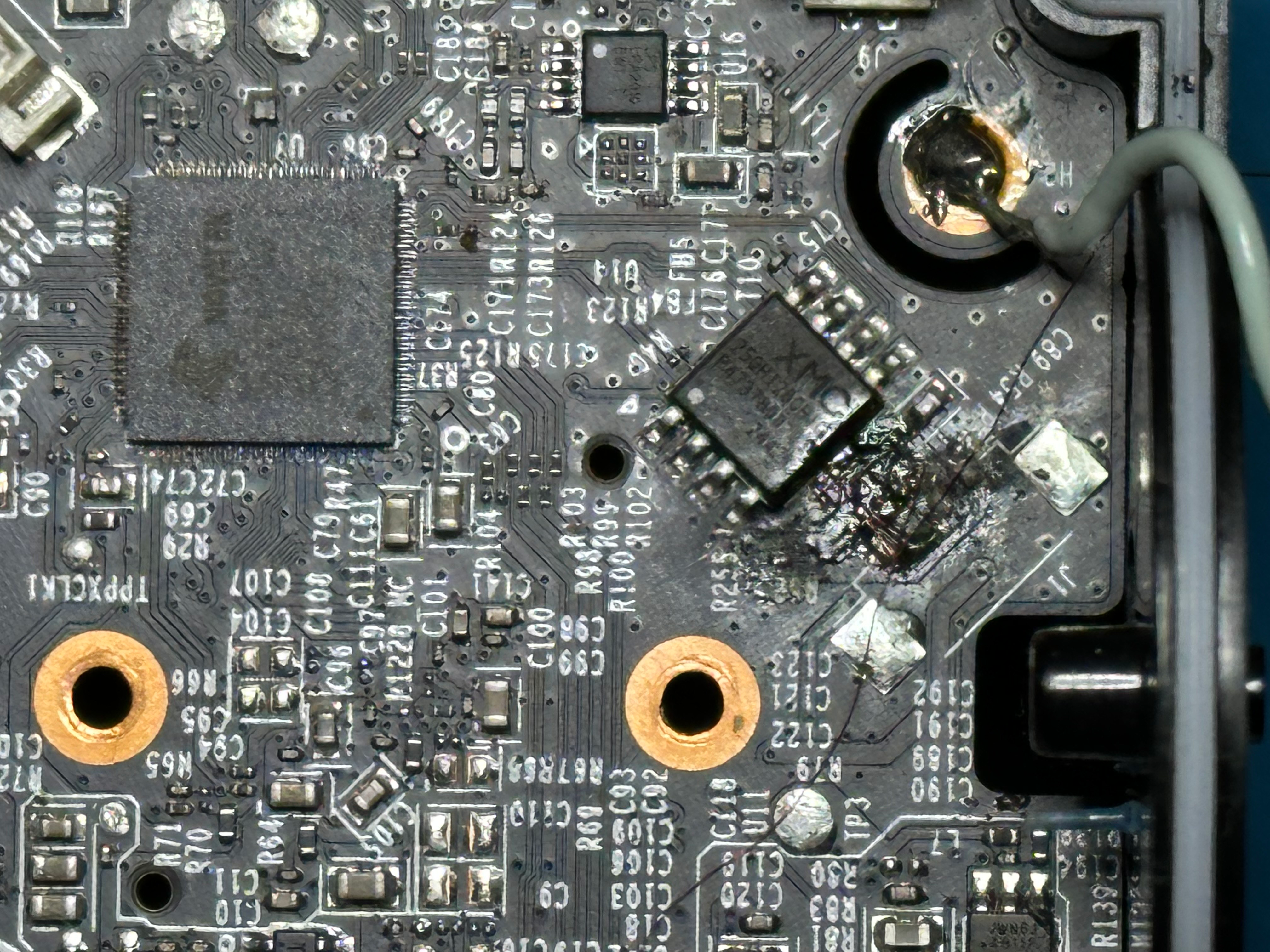
On the PCB the footprint of an unpopulated header can be seen, where GND and 3.3V pins are present. The remaining two pins were suspected to belong to a serial port, however, there was no signal on either of them. By following the traces from the header, we noticed footprints of unpopulated resistors placed in serial at the trace, effectively separating the header from the other side of the trace, which eventually leads to the main SoC.
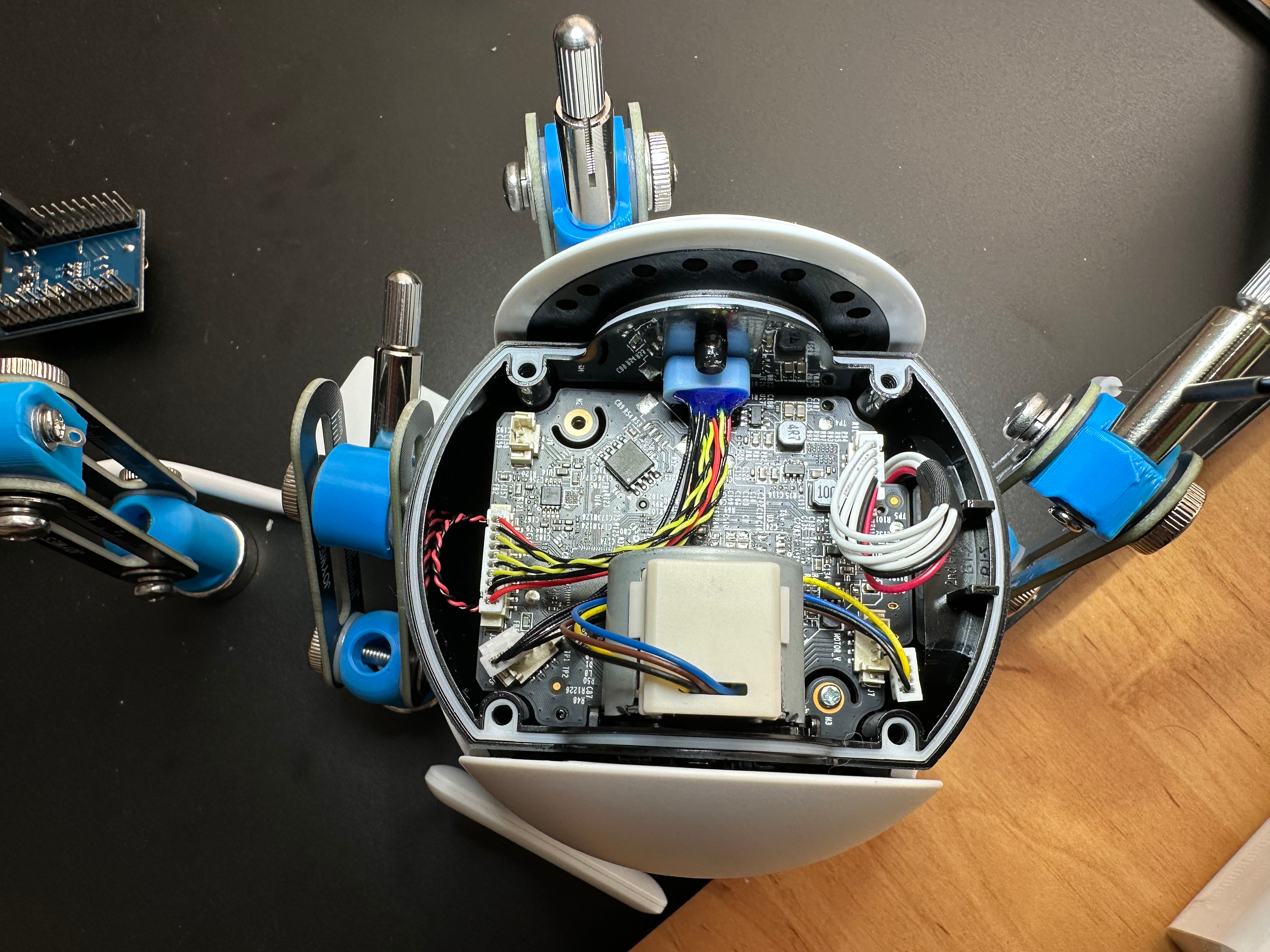
By bridging the missing resistor with a thin wire and connecting the supposed RX and TX lines to a USB serial adapter, we were finally able to get the boot logs. What’s more, we even got dropped to a root shell by simply pressing ENTER.
Attack Vector Enumeration
For our research, we dived into the physical access and network adjacent attack vectors. With physical access, we already demonstrated above that it is possible to run arbitrary code.
The network-adjacent (LAN) access is interesting, both in a wired and wireless setting. Some commands can theoretically be sent directly from the controller to the device, if on the same LAN. The camera operates multiple servers (web and other) for this.
Besides the HTTP server, we looked at other running services as well:
tcp/443: HTTP(HTTPS)tcp/8800: TPHTTPtcp/2020: ONVIFudp/3702: ONVIF Discoveryudp/20002, udp/20010: TDPD
TDPD
TDPD is a custom JSON-based discovery protocol over UDP for TP-LINK devices. It runs on UDP ports 20002 and 20010. It can be used by applications and TP-LINK smart home hubs to discover devices (e.g. cameras) on the network. The devices in response send data about themselves, for example their name, model, authentication type, network info, etc. It can be either a broadcast or a unicast message direct to the camera. There is no public documentation for this protocol, so we only had our own reverse engineering to go by.
The basic structure is the following:
typedef struct tdpd_header {
    uint8_t version;
    uint8_t reserved;
    uint16_t opcode;
    uint16_t payload_len;
    uint8_t flag;
    uint8_t result;
    uint32_t sn;
    uint32_t checksum;
    char payload[0]; // a JSON content
} tdpd_header;
The key finding is that this discovery protocol does not include authentication, i.e. it is an open attack surface from the LAN. At the same time, it was a fairly small, self-contained implementation, so we focused on fuzzing it via emulation. In particular, the TDPD parser uses a JSON parser library that looks very similar to the JSON-C library, but it has differences in the data structures it uses.
In the end, our fuzzing of this attack surface didn’t yield vulnerabilities, however we did end up making use of this protocol as a building block for an RCE exploit of a different vulnerability in the ONVIF stack.
ONVIF
ONVIF is a SOAP/XML/HTTP/TCP-based protocol specifically for IP cameras and similar devices. The ONVIF Device Discovery procedure is described e.g. here. The ONVIF authentication procedure is described as part of the SOAP WS-Security extension.
Specifically, the device under testing only supports http://docs.oasis-open.org/wss/2004/01/oasis-200401-wss-username-token-profile-1.0#PasswordDigest.
The internal name for ONVIF credentials is “third account”, and can also be set from the Tapo App: https://www.tp-link.com/us/support/faq/2680/
ONVIF is disabled by default.
To enable it, credentials must be set up (see the example below in the @executing authentication queries` section).
Accordingly, there are 3 possible attack surfaces:
- if ONVIF has not been enabled by the valid user, an HTTP authentication bypass vulnerability is necessary in order to enable it, otherwise the attack surface is dead
- if ONVIF has been enabled by the valid user, an attacker on the LAN can target pre-auth parsing vulnerabilities in the ONVIF stack
- if ONVIF has been enabled by the valid user, an attacker on the LAN needs to either possess the
third_accountpassword (potentially due to an HTTP authentication bypass vulnerability that allows control of it) or find a separate authentication bypass for the ONVIF WS-Security procedure itself in order to target post-auth bugs in the ONVIF stack
HTTP 80/443
The HTTP server presents both the obvious attack surface (pre-auth HTTP header/body parsing vulnerabilities) plus whatever the custom command & control protocols implemented over it expose.
Exploits
HTTP server authentication bypass + heap BOF RCE via LAN
Background: Authentication Procedure
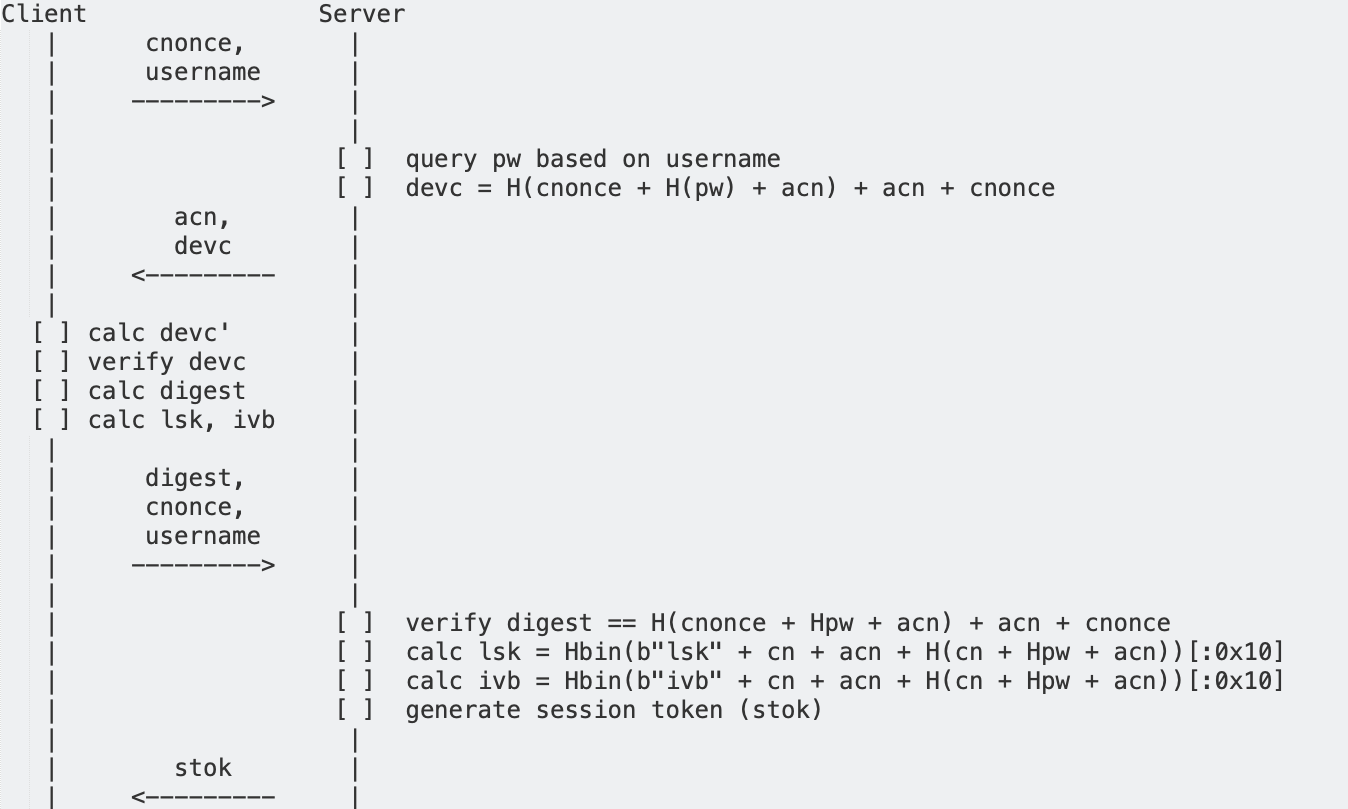

The login procedure on the camera happens in two stages.
Both requests must have a login action specified.
First, the client queries the acn (app-confirm-nonce) using the multipleRequest method.
Then the client calculates the digest password the following way:
H(cnonce + H(pw) + acn) + acn + cnonce
In this procedure, H is SHA256, pw is the user password and cnonce is an arbitrary nonce, which is sent along with the digest to the camera.
In the response, the camera sends back the acn, the device_confirm (devc in the figure) and the stok authorization token (session token).
The device_confirm value contains the hashed password to prove the identity of the device to the app (or other party), as follows:
H(cnonce + H(pw) + acn) + acn + cnonce = device_confirm
So, before actually logging in, the user must query an acn nonce value (by executing the same login, but without providing a password).
An actual query may look like this (although there are several alternative schemas on how to send requests to the device): :
{
  "method": "login",
  "params": {
    "username": username,
    "digest_passwd": digest,
    "encrypt_type": 3,
    "cnonce": cnonce
  }
}
# cnonce is chosen by us (client nonce)
# acn was returned from the first, unauthenticated login request
H = lambda x: hashlib.sha256(x).hexdigest().upper().encode('utf8')
digest = H(cnonce + Hpw + acn) + acn + cnonce
All subsequent requests tagged with the stok, prepended to the path as such: POST /stok=xxx/ds, are authorized with the user account.
Authentication can enable one of the following roles (with some slight simplifications, e.g. some roles support multiple users):
admin: total controlguest: total control, but only accessible pre-setup stage- “Third account”: custom username and password, exclusively ONVIF account credentials
- “Hub”:
- if the User-Agent is
Hub, the credentials are checked against “hub credentials” when logging in as “admin” - limited authorization, specifically restricted for a Tapo Hub. Only whitelisted actions/methods are available.
- Error message is
Hub group has no authority
- Error message is
- if the User-Agent is
- (Cloud: cloud services are implicitly trusted, no authentication is done)
guest user is disabled during the setup procedure implicitly by disabling the configuration key wlan.wlan.ap0.on_boot.
Background: the DS module
The DS module is used for storing persistent configurations (and other, dynamically generated content). This includes:
- ephemeral or device-generated private keys
- persistent configuration (e.g. alarm settings)
- account information
There is also a subsystem in DS for performing actions on the device.
There are do, set (also get and del) actions.
get and set actions are auto-generated from the configuration setup, but for each do action a separate handler must be registered.
These are accessible through ds_handle, which is called with a parsed JSON parameter, which can be accessible from a cloud connection and also an HTTP server running on the device.
The HTTP server also has an authorization pass to enforce login.
Almost all actions are defined by 3 items, a method, module_name and what we call action_name. The request looks like the following:
// Style I
{
  "method": "do",
  "module_name": {
    "action_name": ...
  }
}
// Style II
{
  "method": "special_method_name", // *
  "params": {
    "action_name": ...
  }
}
// Style III
{
  "method": "multipleRequest",
  "params": {
    "requests": [{
      "method": "action_name1", // *
      "params": {
        "module_name": {
          "action_name": ...
        }
      }
    }]
  }
}
*: Method is converted using a mapping defined by /etc/dsd_convert.json. Working examples include syncHubReset and setTimezone.
Also, because of the tree structures, theoretically multiple items can be defined simoultaneously, with each style. And this does work in practice, as each module name and action name is enumerated during both the permission check and the execution.
The http_proc_data_srv uses 3 “passes” to handle DS.
The first pass checks what kind of action to take.
The second pass checks the session’s login state, if authorization is required, based on the previous pass result.
The third pass executes the actual query in ds_tapo_handle.
Authorization is not required for the following two actions:
onboardingis used before/during linking to a cloud account or the device, so there is no user/password/… to authorize against.loginis used for providing an authorization token (stok, session token) based on account information.
Vulnerability in DS
Note that even though there can be multiple types of actions, only one action is stored. However, due to parsing differentials, the first pass only stores the last action in iteration order (which matches the JSON object serialization order).
Thus, if we send a JSON like this, we can bypass the authorization check, and the query gets executed:
{
  "method": "do",
  "ptz": {"set_park_config": {"enabled":"1", "park_time": "2", "action_token": "AAAAA...A"}}, // 60*"A"
  "onboarding": {}
}
This vulnerability is a good stepping stone to elevate lower impact issues in the DS subsystem into critical ones.
The bug can be triggered as follows, after saving the JSON payload in a file named trigger.json, and setting HOST envvar to the IP of the device:
curl -k https://$HOST/ -H 'Content-Type: application/json' -d @trigger.json
In prior art, this old but relevant publication lists interesting attacks once the authentication is bypassed, like: turn off all alarms, format SD card, turn off privacy mode (privacy mode moves the camera to bottom position and restricts the movement of the camera), move the motor.
More importantly, we can go further and exploit post-auth RCE vulnerabilities using this.
RCE
From BOF to heap metadata corruption
Any UDP packet sent to port 20002 will be written to a statically-known location (0x38fc70). The maximum length of this packet is 0x1000. This memory is also executable.
We will use this to set up fake chunks and shellcode before triggering the exploit.
When the HTTP headers of a POST request are too large (nearly 0x1000), /bin/main will allocate another buffer to store the body of the request.
The new allocation’s size is determined by the Content-Length header (0xf00 in our case). However, the program proceeds to read up to 0x1000 bytes into this buffer, allowing for a heap overflow.
Approximately 30 seconds after /bin/main starts, the heap always has a similar shape:

The heap has a large gap in it. The gap is a chunk in the unsorted bin.
This heap layout makes it easy to predict what will happen when the program allocates:
- The new chunk will be split off the start of the gap.
- The gap will be shrunk. It will start after the new chunk and will be placed into the unsorted bin again.
This means that our Content-Length-sized chunk (which we can overflow) will be followed by the gap, currently in the unsorted bin.
Overwriting the chunk metadata, we will set the fd pointer to an arbitrary value, and the bk pointer to the start of the area we can control using the UDP packet.
This way, we can link a series of fake chunks (previously sent via UDP) into the unsorted bin.
Fake chunks
We should make sure our fake chunks cannot be consolidated (merged) backwards or forwards with another chunk to keep things simple. This can be achieved by setting the LSB of the chunks size to 1. This is the PREV_INUSE flag, meaning that the previous chunk is in use, so we will never try to consolidate it. We should also append the bytes 0x05, 0x01 to the chunk. This means that the next chunk’s size is 4 bytes (+ PREV_INUSE), and the next-next chunk is 0 bytes (+ PREV_INUSE). So the next, and the next-next chunk both have the PREV_INUSE bit set, meaning that we will not consolidate with the next chunk (it is in use), and nobody will try to consolidate with us (we are in use).
Of course, these are not valid values (neither 4 nor 0 is a valid chunk size, and our PREV_INUSE bit shouldn’t be set when we’re in the unsorted bin), but the allocator doesn’t mind.
The allocator also doesn’t care much about the fd pointers. These are only used with unlink(), which would only happen when consolidating.
When calling malloc(), the allocator will walk the unsorted bin along the bk pointers. We can use these to chain multiple fake chunks together, since we know where they are in memory.
Because we don’t know where libuClibc-1.0.32.so is in memory (it has ASLR), we cannot point the last fake chunk’s bk back to the unsorted bin, as it should.
Normally, malloc() starts by checking the smallbins (if the request is small) and then iterates over the unsorted bin to satisfy a request. In our case, this unsorted bin iteration can only end in a crash, since it will never be able to complete (reach back to the unsorted bin).
This means that, after we’ve overtaken the unsorted bin, every allocation should be satisfiable just from the smallbins and the unsorted bin. We can make a bunch of fake chunks for various sizes to achieve this.
Target chunk for PC control
At the end of the chain, we’d like to link to a location that would be useful for overwriting. This location also needs to have a chunk size that is reasonable, and a bk pointer that points to a writable location (it will be written to when this chunk is popped from the unsorted bin).
The address 0x3bc098 is suitable for us. This points to a httpd_context structure. The port 443 will be interpreted as the chunk size (which will be 440 after the metadata bits are masked off). The bk pointer will point into the headers we sent (no problem if it is corrupted).
Our goal will be to overwrite the port_reg field of this structure. This normally points to function pointers that are used when parsing an HTTP request, which we will use for arbitrary code execution.
Allocating the target chunk
The program has many threads which allocate frequently and unpredictably. Since the program will crash when it runs out of the unsorted bin, we need to allocate the target chunk as fast as possible. Another HTTP request will not reach the program before it crashes, therefore we need to craft a single HTTP request that both triggers the overflow, and allocates the target chunk.
After receiving the POST request body, the program will start to parse the JSON contained within. We will use a document with the following structure:
{
  "aaa...aaa": "bbb...bbb",
  "ccc...cccXXX": []
}
The program uses a printbuf structure and related functions to store the various strings contained in the JSON. We will first write 208 “a"s, which will make printbuf allocate that many bytes plus 8 extra, giving us an allocation of 216 bytes.
Then, we send slightly more (224) “b"s. The program will attempt to reuse the same printbuf but, because it is too small, it will call realloc() to make it twice as big, giving us an allocation of 432 usable bytes, which means a chunk size of 440, just what we want to allocate into httpd_context.
Next, we can use 60 “c"s, followed by whatever we want to write to the port_reg field. We cannot use null bytes here, but our string will be null-terminated, so using the first 3 bytes of a pointer to data we control (our UDP packet) suffices. This will be written to our printbuf buffer, which is on top of the httpd_context. The program will jump to a function pointer in port_reg before replying to the HTTP request, so we just have to point that to shellcode, also placed via UDP.
Why we needed 3 strings
We could send a string of length 424 to make printbuf allocate a chunk of size 440, allocating our fake chunk. However, since this is a string, we will not be able to insert a null byte into the allocation. Even a \0 escape, although it is interpreted correctly, simply ends the string. This is problematic, since because of ASLR, we only know where the /bin/main binary itself is, and its addresses have a null byte.
Instead, we could use two strings: one with length 424 to allocate the fake chunk, and one with smaller length which will include a null byte at its end. The issue with this approach is that, after our first string is written to the printbuf, it will also get strdup()-ed into its own allocation. However, the target chunk will necessarily be at the end of the unsorted bin - any more allocations that try to use the unsorted bin will crash afterwards. Because the size 424 is too large for smallbins, the unsorted bin will be used by strdup() and crash.
This is why we need two strings to make printbuf allocate space for a string of size 224 first, then double it. This size can be served by smallbins, which we can fill beforehand, so it does not have to use the unsorted bin. Then, we need a third string to use its end as a null byte.
Pre-auth ONVIF stack BOF RCE
LAN attack vector
First of all, we need to have the ONVIF service running on the target in order to reach this bug. This may already be the case on the target device, the regular way for it is:
- send an authenticated request to set account enabled:
"user_management": {"set_account_enabled": {"enabled":"on"}}, - send the following request:
{"user_management": {"change_third_account": {"username": username, "passwd": H(password), ciphertext: ciphertext, "unique_key": 0}}(H is the hashing function introduced above) sets up the “third account” introduced above, the ciphertext can be calculated as:
ciphertext=$(echo -n $PASSWORD | openssl pkeyutl -encrypt -inkey <(base64 -d ./mtd6-squashfs-root/www/cert/onvif/private_key.pem) | base64)
(Note: a reboot might be required for this to take effect.)
But even when ONVIF is not running yet, a separate vulnerability can bypass that limitation as well.
Since the HTTP bypass authentication vulnerability (see above) allows us to execute arbitrary DS do methods, we can use that to enable the ONVIF server.
Specifically, issuing the commands to set up a Camera Account (third_account) and rebooting, implies also starting up ONVIF.
Once the ONVIF attack surface is active, we can use the XML parsing stack buffer overflow vulnerability to hijack the control flow of the main binary, this is straightforward due to the lack of stack smashing protection. From here, there are some complications to using ROP.
Since the overflowing data comes from a string, and strchr will stop if it reaches a null byte, we are unable to utilize a significant amount of the available ROP gadgets, because their addresses are 3 bytes long, and it would require a null byte, which the exploit cannot use.
Actually, the only non-randomized place we found is the main data+text, which is mapped near 0x10000.
We could achieve PC control with this, however, because any address is a valid NUL-terminated string: e.g. 0x12345 becomes \0x45\x23\x01\x00.
Thus, we chose to use shellcode instead of ROP.
This is also straightforward, because there is no NX bit applied to any important structures, and no ASLR for the main executable (although the stack and libraries do start at randomized offsets).
We just need a way to put our shellcode into a known address in memory and we only need to write one address on the stack (which is ok, because the last byte will always be 0 because of snprintf, so it will be a valid address).
To place arbitrary shellcode into known memory, we use the TDPD stack. As mentioned above, TDPD is a TP-LINK specific discovery protocol, running on UDP port 20002. It receives the incoming packets into a global buffer, which is only cleared when a new TDPD message arrives to replace it.
char recv_buff[0x1000];
char send_buff[0x1000];

int tdpd_handle(int socket) {
  memset(&recv_buff,0,0x1000);
  memset(&send_buff,0,0x1000);
  // ...
  bytes_received = recvfrom(socket,&recv_buff,0x1000,0,(sockaddr *)&src_addr,&addr_len);
  // Parsing
}
Knowing this, we only need to send a UDP message to this port with our shellcode.
Once again, this memory region is executable on the device.
After that, we only need to send the malicious SOAP message which overwrites the saved PC on the stack to the recv_buff.
Our PoC shellcode creates a bind shell, which can be seen in the demo.
The full demo contains two steps:
- enable the ONVIF service and subsequently restart the device to ensure ONVIF gets started, using the authentication bypass bug
- pre-auth (no password necessary) remote code execution using the ONVIF XML parser stack buffer overflow bug
As we are already running root, and it is possible to use modprobe, no further privilege escalation is necessary, we are fully in control of the device runtime at this point.
A video demo of the exploit in action:
As an aside, unsurprisingly, we managed to exploit the stack BOF CVE-2026-34122 in much the same way as well:
Browser attack vector
We can use this bug also to pwn the camera through the victim’s browser, assuming the victim has already enabled ONVIF e.g. by using a third party hub. In this case, we need to rethink how we approach putting the shellcode on a known address, because communicating with the TDPD stack via UDP port 20002 is not an option.
Everytime we send an HTTP request, a new connection is used in the main binary. There are 20 connection contexts, each on a fixed address. They contain every information about an HTTP request, including a pointer to the content of the request. If we want to send our shellcode using an HTTP request, we only need to know which of the 20 contexts is being used when we send it. One solution would be to send 20 requests and then we could reliabily use any of the 20 context, but after a connection is closed, the allocation which holds the content gets freed. However, the fields of the context are not reset until the context itself isn’t reused.
One such field we can send controllable data is the path field.
This is a character array which contains the string representation of the path part of the URL.
If we write a shellcode that is able to get the index of the current context and based on that can jump to our shellcode in the body pointer, we only need to overwrite the saved return address of the stack to the path field of the first context structure.
One limitation here was that we needed to send shellcode that only contains readable characters, so that was a little shellcode golfing challenge to overcome, but it did not create a big obstacle.
Another issue we needed to tackle is the alignment of the body pointer.
Based on the user agent HTTP header field, the start of the body can be on even or on uneven address.
Because of this, we need to put the shellcode in it twice: one to an even and one to an odd offset.
This way we will have a shellcode with good alignment no matter how long the header fields are.
So our path shellcode gets the index of the current httpd context (which is stored in a global variable), then gets the body pointer from it.
Checks if the body pointer is even or not, and based on that it calculates the shellcode address and jumps into it.
Then, in the main shellcode we still had to be careful, because we could not assure that the addresses are 4 byte aligned or not, which could cause issues with some instructions when compiling the shellcode.
But other than that, we again opened a bindshell that we could use the same way as in the previous case.
A video demo of the exploit in action:
Cloud account takeover
Refresher: the auth procedure
Lets reiterate an overview of the initial and subsequent authentication procedures (Server is the TP-LINK camera).
The login procedure on the camera happens in two stages.
Both requests must have a login action specified.
First, the client queries the acn (app-confirm-nonce) using the multipleRequest method.
Then the client calculates the digest password the following way:
H(cnonce + H(pw) + acn) + acn + cnonce
In this procedure, H is SHA256, pw is the user password and cnonce is an arbitrary nonce, which is sent along with the digest to the camera.
In the response, the camera sends back the acn, the device_confirm (devc in the figure) and the stok authorization token (session token).
The device_confirm value contains the hashed password to prove the identity of the device to the app (or other party), as follows:
H(cnonce + H(pw) + acn) + acn + cnonce = device_confirm
Offline Bruteforce
The issue is, we don’t need to provide the password and the password hash, nor the digest password.
By simply sending the username and the cnonce, we receive both acn and device_confirm, but not the session token.
If we send an empty string as cnonce, we get the following equations:
H(H(pw) + acn) + acn = device_confirm
H(H(pw) + acn) = device_confirm[:64]
This means that if we have network access to the device, we can send such a login request, and we get the device_confirm, which then we can use to bruteforce the password offline.
Less than ideal as-is, but what made the design a lot worse, is that we have also found that this password matches the password to the Tapo ID cloud account!
This means that the following scenario becomes possible:
- step 1) either of the following:
- use the above described protocol weakness + LAN access to get the input for the bruteforce attack
- physically compromise a device or use a LAN/browser based exploit to take control of it, extract the stored secret that can be used as the input for run the bruteforce attack
- step 2) bruteforce the password offline (which matches the Tapo ID cloud account password) and log into (i.e. gain full control over) every Tapo device linked to the cloud account
An additional finding was that a pass-the-hash style attack can also be used to log into the specific devices (i.e. not to the cloud account), as they will share the same password, if they were linked to the same Tapo ID account, and only the hash is used to prove user’s identity.